
Agentforce Implementation Starts With Data Readiness
It’s tempting to jump right into Agentforce. The promise of AI agents handling tasks, solving problems, and supporting teams almost instantly? That’s powerful. But here’s the part many organizations overlook: without a strong data foundation, agentic AI doesn’t work the way you expect.
Before you build the agent workflows, start routing tickets, or automating responses, you need a clear view of your Salesforce data: what’s accurate, what’s missing, and what the agent will rely on to make decisions. If that foundation isn’t solid, your implementation will either stall or go live without impact. Users will stop relying on the agents, and your business will see little return.
In this blog you’ll learn why data readiness is the critical step for Agentforce success, what that means in practice, and how to check your own readiness, so you don’t end up like the 80% of AI projects that stall in Field Service or in high-tech and professional services companies.
Why Agentforce Implementations Fail (And How to Prevent It) 
When you deploy Agentforce, you’re asking it to act intelligently, autonomously, and in real time (or near real time). That means it must trust the data it consumes. If your data is inconsistent or siloed, the agent will struggle or deliver weak results. It’s one of the top reasons agent rollouts fail to meet expectations.
For example:
- If you have duplicate customer records, the agent might see the same person as multiple people and make incoherent suggestions.
- If key fields are blank or full of default values, your agent may “guess” the wrong answer, increasing risk of AI hallucination.
- If your data governance is immature (no clear ownership, standards, access controls), the agent might use the wrong information or violate compliance.
In short, your agent can only perform as well as the data it relies on. Thankfully, these challenges are avoidable, but only if you start with a clear view of your current data state.

What “data readiness” really means for Agentforce
Agentforce doesn’t need perfect data, but it needs the right data. The cleaner, more complete, and better organized it is, the more reliable your results. —and the more effective your fallback systems.
Let’s break it down into the key dimensions you need to check and act on.
-
Data Quality and Completeness
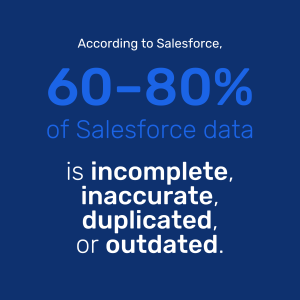
Data quality is always the foundation. Agents can only act on the information they’re given. If that data is missing, outdated, or inconsistent, results will be off.
In practice:
- Critical fields like customer segment, account status, service location, and product ownership must be consistently populated and up to date.
- Duplicate records need to be resolved, especially when customers, assets, or technicians appear multiple times across systems.
- Stale or unused data should be reviewed and cleaned out.
- Consistent formatting matters. Agents perform better when states, phone numbers, and codes follow a standard structure.
-
Accessibility and Integration
Even clean data won’t help if your agent can’t access it. Many orgs have good information, but it’s fragmented across systems that don’t talk to each other.
For Agentforce to function well, your key systems (CRM, field service, ERP, inventory, and knowledge bases) must be connected. A full picture is critical for the agent to understand context and make useful decisions.
To ensure accessibility:
- Identify the exact data sources and systems your agent needs to connect to
- Standardize naming conventions and field structures across systems to reduce ambiguity
- Enable real-time or near-real-time syncing for data that changes frequently, such as technician availability or product inventory
- Normalize data where possible so agents don’t get tripped up by different formats
For example, a Scheduler Assistant Agent needs access to calendars, certifications, appointments, parts, routes, and job priorities. Without that full view, it can’t make intelligent recommendations or flag issues in time. Integration is what makes the agent a true extension of your team.
-
Governance and Backup Systems
AI implementations introduce new responsibilities around data management. Governance ensures that the data your agent is using is available, secure, accurate, and well-managed over time.
Governance includes:
- Defining clear ownership for each data domain or object (so someone is accountable for quality)
- Setting access permissions to ensure agents only pull the data they’re supposed to
- Tracking and reporting on data health with ongoing monitoring
You should also expect—and plan for—data imperfections. That’s why every implementation should include exception handling systems. We work with clients to build guardrails that catch missing or conflicting data before it causes a bad outcome. But these backup processes should act as safety nets only, not daily crutches. Clean data keeps exceptions from becoming the norm.
-
Use Case Alignment and Prioritization
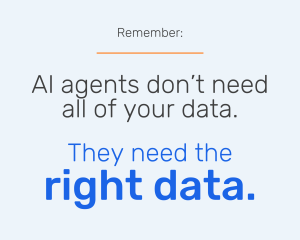
Start by preparing the data that directly supports the use case you’ve chosen. Focus on what the agent needs to perform its role, based on the business process it’s supporting.
To do this well:
- Clearly define the business process the agent will support: sales, field service, dispatch, customer service, etc.
- Map out the specific records, fields, and logic the agent will rely on to complete its tasks
- Prioritize high-impact areas first so you can get to value faster, without falling into “clean everything” paralysis
For example, a sales-focused agent won’t need access to service parts inventory, but it will need deal stage, past interactions, territory rules, and key contact roles. By narrowing the focus, you reduce risk and speed up deployment.
The more aligned your data is to the job you’re asking the agent to do, the more helpful it becomes.
Your Data Readiness Checklist
Here’s a concise checklist you can run now:
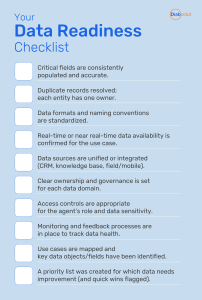
If you find “no” on multiple items, pause and address those gaps before pressing ahead with agent design and rollout. It saves time, cost, and disappointment later.
Why You Need a Data Readiness Assessment
Most organizations have some data issues. That’s normal. But the key is knowing which ones will actually derail your Agentforce plans, and which you can address later. That’s what our Agentforce Health Check is built for.
Get clear on your data state and next steps to get started
Here’s what you’ll get:
- A full scan of your Salesforce data, use cases and current systems
- An Agentforce Readiness Scorecard that breaks down where you stand
- A fix-it plan for current gaps with step-by-step actions you can actually follow
- A 1-on-1 strategy session to define your highest-value use case
- A custom AI readiness roadmap for your org
The assessment helps you benchmark where you are and gives you a focused roadmap to get your data Agentforce-ready. It’s built to help leaders move quickly and launch with confidence, backed by a clear, actionable plan.
The Key to Becoming an Agentic Enterprise
Most Salesforce orgs have issues with data quality. The key is knowing which issues will slow you down and what to fix first. When your data is aligned, accessible, and clean enough to support automation? That’s when Agentforce delivers measurable value and real adoption.
Your data isn’t just a nice-to-have—it’s fundamental to evolving into an Agentic enterprise. Want to get there faster, and with less risk? Book your Data Readiness Assessment now, and take the first step toward an Agentforce implementation that actually works. It’s fast, free, and built around your goals.